
Resume & CV Photo Size (CM, Inches & Pixels): Exact Dimensions + Guidelines (2026)

This article is part of our Professional Headshots collection.
Originally published: February 13, 2025 · Updated: October 15, 2026
The standard international CV photo size is 3.5 × 4.5 cm (35 × 45 mm). For US-style resumes, the most common size is 2 × 2 inches (51 × 51 mm). For digital uploads, use 400 × 400 to 600 × 600 pixels at 300 DPI in JPG or PNG format, keeping the file under 1 MB.

Note: In the US and UK, resumes typically do not require a photo. In many European and Asian countries, a professional headshot on your CV is standard practice.
Quick Reference: Resume & CV Photo Sizes
| Format | Size | Pixels at 300 DPI | Best For |
|---|---|---|---|
| International CV | 3.5 × 4.5 cm (35 × 45 mm) | 413 × 531 px | European and Asian job markets |
| US-style resume | 2 × 2 inches (51 × 51 mm) | 600 × 600 px | US applications requiring photos |
| Digital upload (square) | — | 400 × 400 to 600 × 600 px | Online portals, PDF resumes |
| LinkedIn profile | — | 400 × 400 to 7680 × 4320 px (we suggest 800 × 800) | Professional networking |
File format: JPG or PNG | Resolution: 300 DPI | Max file size: Under 1 MB
Resize your photo to the exact CV size
Pick a size, drag to position your face, then download. Everything runs in your browser.
Drop a photo here
Your photo never leaves your device. Nothing is uploaded.
Why Does Your CV Photo Matter?

A professional photo on a CV shapes how employers perceive you before reading a single word. Studies show recruiters spend more time reviewing CVs with high-quality headshots — a well-composed photo signals attention to detail and workplace readiness.
In industries where personal presentation matters (sales, client-facing roles, consulting), a polished headshot directly supports your application. A poorly lit selfie or casual snapshot does the opposite.
Your photo should be recent and reflect your current appearance. Outdated photos create trust issues if you look different in an interview.
Resume Photo Size in CM
The most widely accepted CV photo size internationally is:
- 3.5 × 4.5 cm (also written as 35 × 45 mm)
- This is the same as passport-style format used across Europe and Asia
- Works well for printed CVs and traditional job applications
Resume Photo Size in Inches
For US-style formats or systems requiring imperial measurements:
- 2 × 2 inches is the most common square format
- The photo should be centered with the face occupying about 60–70% of the frame
- Keep margins clean and avoid stretching the image to fit
Resume Photo Size in Pixels
For online applications and digital uploads:
- 400 × 400 pixels — minimum for most portals
- 600 × 600 pixels — recommended for sharp display on screens and print
- Aspect ratio: 1:1 (square) or 3:4 (vertical crop)
- Resolution: Always maintain 300 DPI for print-ready documents
Is 2×2 Required for a Resume Photo?
Some job portals specifically request a "2×2 picture." This typically means:
- 2 inches × 2 inches
- 51 × 51 mm
- 600 × 600 pixels at 300 DPI
- Square format with a neutral background
Only use 2×2 when specifically requested. Otherwise, the 3.5 × 4.5 cm international format is widely accepted.
What Background Color Is Best for a CV Photo?
A neutral background keeps attention on your face:
- White — safest universal choice
- Light grey — professional, reduces glare
- Soft blue — common in corporate photography
Avoid textured walls, bright colors, or distracting environments. The ideal background should be clean and uncluttered with no visible objects, artwork, or furniture.
Professional studio backgrounds give the most consistent results, but a free profile picture maker can tidy up a DIY portrait taken against a simple, well-lit wall if it is free of marks or texture.
How Should You Dress for a CV Photo?
Professional attire should match your industry standard:
- Corporate roles: Dark business suit or blazer with neutral colors
- Creative industries: More relaxed business wear is acceptable
- General rule: Clean, wrinkle-free, well-fitted clothing
Keep jewelry minimal — one small necklace or pair of earrings is sufficient. Avoid busy patterns or bright colors that draw attention away from your face.
For detailed guidance on what to wear, see What to Wear for Professional Headshots.
How to Take a Professional CV Photo
Lighting
Natural light works best — position yourself near a large window during early morning or late afternoon. Face the light source to eliminate harsh shadows under the eyes or nose.
Framing and Pose
- Frame from shoulders up, with your head and shoulders filling about 60% of the frame
- Eyes level with the camera lens
- Look directly at the camera or use a slight three-quarter angle
- Maintain good posture with a natural, friendly expression and a light smile
Resolution and File Size
- Aim for at least 300 DPI for sharp printing
- Final dimensions: 600 × 600 pixels for digital, 2 × 2 inches for print
- Keep the file under 1 MB for ATS compatibility
- Save as JPG or PNG
For a guide to headshot dimensions across all platforms (LinkedIn, Instagram, websites, 8×10 prints), see Headshot Size: Standard Dimensions, Aspect Ratios & Pixels.
Should You Use an AI Headshot for Your CV?
AI headshots for resumes have become a practical alternative to traditional photography for CV photos. They are faster, more affordable, and produce consistent results.
When AI headshots work well for CVs:
- You need a professional photo quickly and cannot schedule a photographer
- You want multiple style options (business, creative, casual) from one session
- You need consistent team headshots for a company website
- Budget is limited — AI tools start around $35 vs $200+ for traditional photography
When to use traditional photography:
- Your industry requires a very specific look (e.g., acting, modeling)
- You need photos for official government or legal documents
- Your company policy requires traditional photography
BetterPic generates 4K headshots that meet resume and CV requirements — 300 DPI, neutral backgrounds, professional styling — with results ready in 1–2 hours. For a free option, BetterPic also offers a free AI headshot generator with up to 10 4K headshots.
How to Integrate Your Photo into a Resume Template
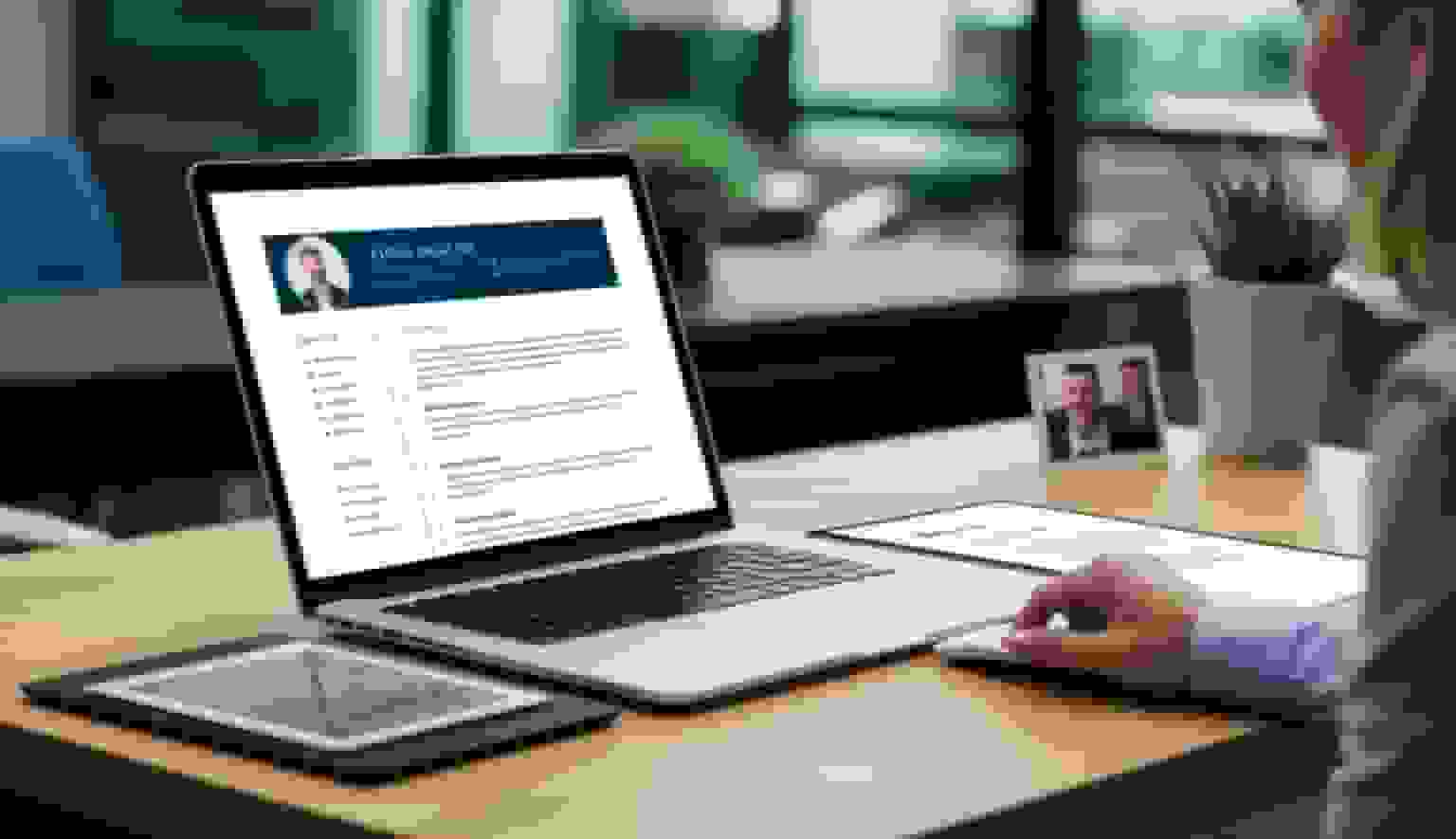
Placement
- Place the photo in the top section, aligned with the header or contact information
- Use square or rectangular format, sized between 2 × 2 inches and 2.5 × 2.5 inches
- Leave white space around the photo for visual balance
- Do not overlap the photo with text or other design elements
Design Consistency
- Match the photo's background to the resume's color scheme
- The photo's border style should complement existing design features
- Adjust text wrapping to prevent awkward spacing
ATS Considerations
Many companies use applicant tracking systems (ATS) that may strip images from applications. If applying through an ATS, prioritize having your photo on LinkedIn and your personal website rather than embedded in the PDF.
Optimizing Your CV Photo for Online Platforms
LinkedIn
Professional photos enhance your LinkedIn presence significantly. LinkedIn profile pictures should be square, between 400 × 400 and 7680 × 4320 pixels, with your face centered. Adjust brightness, contrast, and sharpness for optimal screen display. For the sizes Facebook, Instagram, WhatsApp and other platforms ask for, see profile picture size by platform.
Digital Portfolios and Business Cards
Use the same headshot consistently across all platforms to build recognition. For business cards, the photo needs to work in both print (300 DPI) and digital formats. Keep digital versions under 1 MB while maintaining visual quality.
Legal Considerations: When Should You Include a Photo?
Photo requirements vary by region:
| Region | Photo on CV? | Notes |
|---|---|---|
| US, UK, Canada, Australia | Generally not recommended | Anti-discrimination laws; photos can introduce bias |
| Germany, France, Spain | Common and expected | Professional headshot is standard practice |
| China, Japan, South Korea | Usually required | Passport-style format is typical |
| Middle East | Varies by country | Often expected in private sector |
Many companies use ATS systems that automatically remove photos to comply with equal opportunity regulations. When in doubt, skip the photo on your resume and invest in a strong LinkedIn profile headshot instead.
Frequently Asked Questions
What is the standard size of a picture on a resume?
The most common resume photo size is 3.5 × 4.5 cm internationally or 2 × 2 inches in US-style formats. For digital uploads, use 400 × 400 to 600 × 600 pixels at 300 DPI.
What is the resume photo size in pixels?
For digital uploads, 600 × 600 pixels at 300 DPI is recommended. The minimum acceptable size for most online portals is 400 × 400 pixels.
Is 2×2 required for a resume photo?
Only when specifically requested by the employer or application portal. Otherwise, 3.5 × 4.5 cm (international) or a square format at 400–600 pixels works for most applications.
Should I include a photo on my resume?
In the US and UK, photos are generally not required and may even be discouraged. In many European and Asian countries, a professional headshot is expected. Check the norms for your target country and industry.
What background color is best for a CV photo?
White, light grey, or soft blue backgrounds are the most professional and universally accepted. Avoid textured or brightly colored backgrounds.
Can I use an AI-generated headshot on my CV?
Yes. AI headshots from tools like BetterPic are widely accepted for CVs, resumes, and LinkedIn profiles, as long as the image accurately represents your current appearance. For tips on getting the best results, see AI Prompt for Professional Headshot — Templates and Tools.
Sources & References
- Photo won't upload to your profile — LinkedIn Help
- LinkedIn Profile Photo Tips — LinkedIn
- How Your Profile Photo Impacts Your LinkedIn Presence — LinkedIn Official Blog
- AI Image Generation Market Report — Grand View Research
- How AI Is Changing Photography — Forbes
- Professional Headshot Photography Pricing — Thumbtack

Written by
Apoorv SharmaHead of Performance
Apoorv leads performance and growth at BetterPic with 9+ years of experience across SEO, SEM, and growth marketing. He oversees content strategy, data-driven marketing, and hands-on testing of AI headshot platforms. Previously held senior performance marketing roles across the US, Belgium, and India.
- Google Analytics & Google Ads certified
- HubSpot Inbound & Content Marketing certified
- 9+ years in SaaS growth and performance marketing
Preferred source
Follow BetterPic on Google
Add BetterPic as a preferred source and our headshot guides are more likely to show up in your Top Stories, with a badge in AI Mode and AI Overviews.

Related resume and job-seeker headshots resources
Keep exploring this topic with focused resources from the B2C journey.
Primary destination:Resume headshots
Frequently Asked Questions
What is the standard size of a picture on a resume?
- The most common resume photo size is 3.5 × 4.5 cm (35 × 45 mm) internationally, or 2 × 2 inches (51 × 51 mm) in US-style formats. For digital uploads, use 400 × 400 to 600 × 600 pixels at 300 DPI in JPG or PNG format, keeping the file under 1 MB.
What is the resume photo size in pixels?
- For digital uploads and online portals, 600 × 600 pixels at 300 DPI is recommended. The minimum acceptable size for most platforms is 400 × 400 pixels. Use a square (1:1) or vertical (3:4) aspect ratio, and save as JPG or PNG format.
Should I include a photo on my resume?
- It depends on your region. In the US, UK, Canada, and Australia, photos are generally not recommended due to anti-discrimination practices. In many European countries (Germany, France, Spain) and Asian countries (China, Japan, South Korea), a professional headshot on your CV is standard and expected. Check the norms for your target country and industry.
What background color is best for a CV photo?
- White, light grey, or soft blue backgrounds are the most professional and universally accepted for CV photos. These neutral colors keep attention on your face while maintaining a clean, professional appearance. Avoid textured walls, bright colors, or distracting environments.
Are AI-generated headshots acceptable on a CV?
- AI headshots are widely accepted for CVs, resumes and LinkedIn profiles, provided the image accurately represents your current appearance. That single condition is what separates an acceptable one from a misleading one.
What file format should I use for a CV photo?
- JPEG or PNG formats work best for CV photos. Both maintain good quality while keeping file sizes manageable. The resolution should be 300 DPI for sharp printing quality. Keep the file size under 1 MB to prevent issues with applicant tracking systems (ATS) and online upload portals.
Related articles
View all articles
Business casual headshots: what to wear, backgrounds and examples
What business casual means in a headshot, what to wear, which colors and backgrounds work, when a suit is still the better choice, and three examples of where the line sits.
Hairstyles for headshots: how to wear your hair for a professional photo
How to wear your hair for a professional headshot: when to cut or color it, how to handle frizz and flyaways, what works for short, long, curly and braided hair, and what changes when the headshot is made with AI.
How much does a headshot cost in 2026?
What professional headshots actually cost, what drives the range, the charges that are not in the quoted price, and how to compare a session against an AI alternative.
Cheap AI Headshots: What $29 Actually Gets You vs. a $400 Photographer
A no-BS breakdown of cheap AI headshots in 2026: what they cost, how they compare to studio photography, and whether the results actually work for LinkedIn.
Professional Headshots: The Complete Guide to Getting Yours Right
Everything you need to know about professional headshots: how to get them (photographer, DIY, AI, corporate), what to wear, posing tips, lighting.
How to Get a Professional Headshot for Your Career
A complete guide to getting a professional headshot for your career—compare photographers, AI headshot generators, and DIY options by cost, quality, and speed.
Save 87%on average on your professional photos.
Whenever, wherever you are.
Get studio-quality, 4K images in a variety of outfits & settings in less than an hour.
Get your headshots nowStart now
