
What to Wear for Professional Photos (9 Tips That Actually Work)
This article is part of our Professional Headshots collection.
You have a professional photo session coming up. You open your closet. And you freeze.
Most people get stuck right here, not because they don't own nice clothes, but because a camera changes the rules. That shirt you love in real life? It might strobe, wrinkle, or wash you out under studio lights. The blazer that looks great at dinner? Could swallow your shoulders in a headshot.
The short version: wear solid colors in rich tones, make sure everything fits well, pick fabrics that don't shine, and keep accessories simple. The rest of this guide breaks down exactly how to do each of those things, plus some industry-specific advice and a shortcut using AI headshots if you want to skip the photoshoot entirely.
What colors photograph best for headshots?
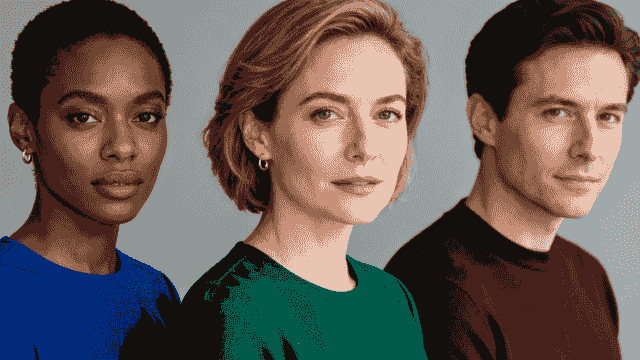
Solid, saturated colors -- especially jewel tones like sapphire, emerald, burgundy, and deep plum -- are the safest bet for almost everyone.
Here's why: a headshot is about your face. Anything your outfit does to pull the viewer's eye away from your expression is working against you. Solid colors stay quiet. They let you be the subject.
Jewel tones go a step further. They have enough richness to look interesting on camera without creating problems. They work across a wide range of skin tones. And they don't date as fast as trendy colors.
A few things to avoid on the color front:
- Neons and fluorescents bounce colored light onto your skin and can make you look slightly green or orange in photos.
- Stark white can blow out under studio lights, creating a glare that distracts from your face.
- All black sometimes flattens your frame, though a black blazer with a colored top underneath works well.
Before your session, hold different tops up to your face in natural window light. You'll see pretty quickly which colors make your skin look healthy and which ones drain it. That two-minute test saves a lot of regret.
For more on making your photo work on specific platforms, check out these tips for powerful LinkedIn headshots.
Why does fit matter so much on camera?
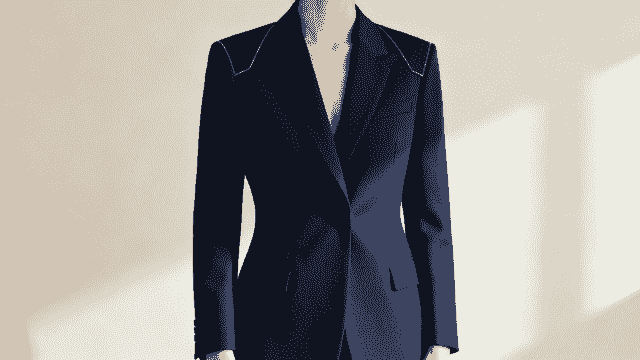
A well-fitted outfit is the single fastest way to look more polished in any photo, period. The camera picks up every wrinkle, pull, and sag that your eye skips over in person. Fabric bunching at the waist, a collar that gaps, sleeves that are two inches too long -- all of it shows.
Here's what good fit looks like in practice:
- Shoulder seams sit right at the edge of your shoulders, not drooping down your arm or riding up toward your neck.
- Blazer buttons close without pulling or creating an "X" shape across your chest.
- Sleeve cuffs end at your wrist bone.
- You can sit, stand, and move your arms without the fabric fighting you.
If something fits well off the rack, great. If it doesn't, a tailor can usually fix the most common issues (taking in a waist, shortening sleeves, adjusting a collar) for $15-40. Get your outfit to the tailor at least two weeks before your shoot so there's time for alterations.
The real payoff is confidence. When your clothes fit right, you stop tugging and adjusting. You stand straighter. That ease shows through in the photo, and it's something no amount of retouching can fake.
A strong-fitting outfit matters for any professional image, including the one on your resume. Here are more tips for professional resume headshots.
Which patterns should you avoid (and which are okay)?
The simple rule: if a pattern has thin, repeating lines, skip it. Tight pinstripes, small checks, herringbone, and gingham all risk creating a moire effect on camera. That's the shimmery, wavy distortion you sometimes see on TV news anchors -- and it can ruin an otherwise perfect shot.
Beyond the technical issue, busy patterns just compete with your face. A bold paisley or loud floral turns your headshot into a fashion photo, which isn't the point.
That said, not all patterns are off-limits:
- Wide, low-contrast stripes (like a navy-and-charcoal combo) usually photograph fine.
- Subtle textures -- a tweed weave, a pique knit, a lightly textured cotton -- add visual interest without creating noise.
- Tone-on-tone patterns (a dark navy on slightly lighter navy, for example) read as almost solid on camera but give the fabric some depth.
When in doubt, go solid. You'll never regret it.
Do you really need a blazer?
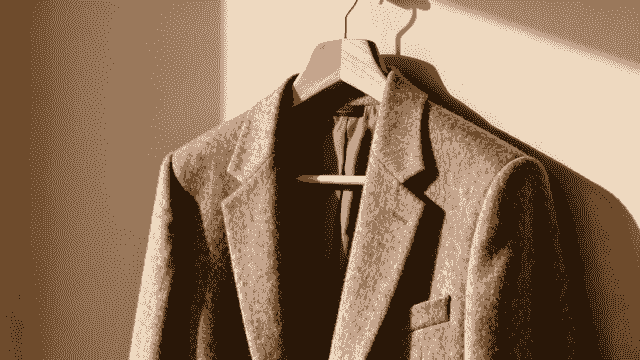
Not always. But a well-made blazer is the closest thing to a cheat code for looking put-together in a headshot. It adds structure to your shoulders, frames your torso, and instantly reads as "professional" in ways that are hard to replicate with other garments.
The quality of the blazer matters more than the brand. A $120 blazer in a wool blend that fits your shoulders perfectly will outperform a $600 designer piece that's a size too big. Look for:
- Natural or natural-blend fabrics (wool, cotton-wool, linen-wool) that drape well and don't shine.
- A structured lining that helps the blazer hold its shape through a long session.
- Clean stitching and buttons that sit flat.
Pair it with a good basic underneath -- a crisp button-up, a silk shell, a fine-gauge knit -- and you have a polished look that works for everything from LinkedIn to your company's About page.
How does layering give you more options during the shoot?
One outfit plus a removable layer equals two different looks in the same session. A navy blazer over a burgundy shell can give you a formal shot (blazer on) and an approachable one (blazer off) without changing clothes.
Layering also adds visual depth. A single flat-colored top can look a little plain on camera. Add a contrasting jacket and suddenly there are clean lines, angles, and dimension in the frame.
A few layering guidelines:
- Stick to two pieces max in the frame (an inner layer plus an outer layer). Three layers start to look bulky in a headshot crop.
- Create contrast between layers. A charcoal blazer over a white top, a navy cardigan over a soft pink blouse -- the difference doesn't need to be dramatic, just visible.
- Make sure the outer layer fits well when buttoned and when open. You'll likely shoot both ways.
What necklines work best for headshots?
Your neckline is the frame closest to your face, so it has an outsized effect on how the whole photo reads.
V-necks are the most universally flattering option. The downward angle creates a vertical line that makes your neck look longer and draws the eye up toward your face. They also leave a nice open area for a simple necklace if you want one.
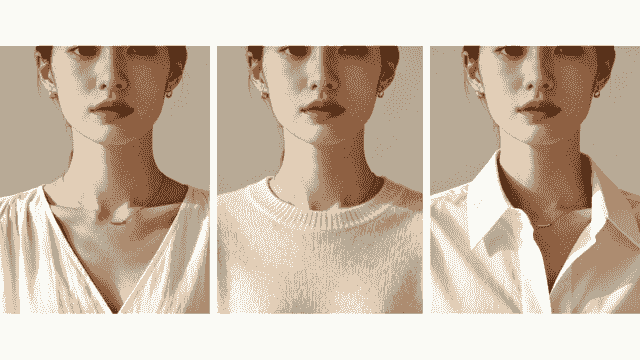
Other necklines and when they work:
| Neckline | Best for | Watch out for |
|---|---|---|
| V-neck | Almost everyone; elongates the neck | Very deep V-necks can look too casual |
| Crew neck | Clean, classic look; great base for a blazer | Can shorten the neck on some people |
| Collared button-up | Corporate, legal, finance settings | Make sure the collar lies flat and isn't too tight |
| Scoop neck | Softer, approachable feel | Avoid scoops that are so wide they slip off the shoulder |
| Turtleneck | Stylish and modern in the right context | Can visually compress a shorter neck |
The key is trying it on and checking in a mirror from roughly the distance a camera would be (about 4-6 feet). If something looks off at that distance, it'll look off in the photo.
What about accessories -- how much is too much?
Keep it to two or three pieces, and nothing that swings, dangles, or catches the light like a mirror.
Good accessory choices for a headshot session:
- Stud earrings (pearl, diamond, simple metal)
- A thin necklace that sits along the collarbone
- A classic watch
- Simple, small hoop earrings
What to leave at home:
- Long dangling earrings that blur when you move
- Chunky statement necklaces that compete with your face
- Highly polished or oversized metallic pieces that throw reflections under studio lights
Glasses are fine if you normally wear them -- just make sure the lenses are clean and consider asking your optician about anti-reflective coating if you don't already have it. Glare on glasses is one of the most common headshot problems, and it's easy to prevent.
Does your industry change what you should wear?
Yes, and it's worth thinking about this before you default to a generic "business casual" look.
Finance, law, consulting: These fields still lean formal. A dark blazer (navy, charcoal) over a collared shirt or structured blouse sends the right signal. Stick with blues and grays -- they read as trustworthy and steady.
Tech and startups: You have more room to relax. A well-fitted crew neck sweater or a clean button-up without a tie can look right. Darker jewel tones or even a rich black work well here.
Creative industries (design, marketing, media): You can push color further. A deep teal, plum, or rust adds personality without being unprofessional. Interesting textures and slightly less traditional silhouettes are fair game.
Healthcare: Soft, calming tones (muted greens, warm blues, soft grays) tend to work well. Patients want to see someone who looks approachable and competent, not intimidating.
Real estate and sales: Warmth and approachability matter here. Think rich but not dark -- a warm blue, a soft burgundy, a camel or cognac layer. You want to look like someone people want to spend time with.
If your company has brand colors, consider working one into your outfit as an accent. A pocket square, a blouse, or a tie in a brand color ties your personal image to the organization without looking like a uniform.
For teams looking to coordinate outfits across multiple people, BetterPic's team headshot solution can help keep everyone looking consistent.
What fabrics look best on camera (and which ones cause problems)?
Natural fibers -- wool, cotton, silk, linen -- almost always photograph better than synthetics. They absorb light instead of bouncing it back, which means fewer hot spots and a richer, more natural look in the final image.
Fabrics to reach for:
- A mid-weight wool or wool-blend blazer (holds its shape, resists wrinkles, looks polished)
- A matte silk or silk-blend shell (drapes well, adds a subtle sheen without being shiny)
- A fine cotton button-up (crisp, clean, photographs beautifully when pressed)
- A quality cotton-cashmere or merino knit (texture without pattern, comfortable for long sessions)
Fabrics to avoid:
- Polyester and cheap blends can look shiny and plasticky under studio lights.
- Thin jersey clings and shows every bump and wrinkle.
- Satin throws harsh reflections and often reads as "evening wear" rather than "professional."
Whatever fabric you choose, steam or press your outfit the morning of the shoot. Wrinkles are far more visible in a professional photo than in real life, and they're distracting in the final image.
Quick-reference comparison: 9 wardrobe tips at a glance
| Tip | Effort to implement | Impact on your photos | Who benefits most |
|---|---|---|---|
| Solid colors and jewel tones | Low -- you probably own something | High -- keeps focus on your face | Everyone |
| Well-tailored fit | Medium -- may need a tailor visit | Very high -- the biggest single upgrade | Everyone, especially executives |
| Avoid busy patterns | Low -- just pick a solid instead | High -- prevents moire and distraction | Everyone |
| Quality blazer and basics | Medium to high -- a real purchase | Very high -- instant polish | Senior professionals, repeat shooters |
| Strategic layering | Low to medium -- use what you have | Medium-high -- adds depth and variety | Anyone wanting multiple looks |
| Flattering neckline | Low -- no cost, just awareness | Medium-high -- better face framing | Everyone |
| Minimal accessories | Low -- leave extras at home | Medium -- removes distraction | Everyone |
| Industry-appropriate styling | Low -- mostly planning | Medium-high -- sends the right signal | Industry-specific professionals |
| Good fabric choices | Medium -- may mean upgrading a piece | High -- better texture, less shine | Close-up and studio shoots |
FAQ: What to Wear for Professional Photos
What is the best color to wear for a professional headshot?
Solid jewel tones work best for most people. Sapphire blue, emerald green, burgundy, and deep plum are all safe picks that flatter a wide range of skin tones and stay out of the way of your expression. Navy and charcoal are also reliable standbys, especially in corporate settings.
Should I wear a suit or blazer for professional photos?
A blazer is almost always a good idea -- it adds structure and polish without requiring a full suit. That said, it depends on your industry. Lawyers and bankers will probably want the full blazer-and-collar look. Someone in tech or a creative field can get away with a nice sweater or a structured top. Match the formality to what you'd actually wear in a professional setting.
Can I wear patterns in a professional headshot?
You can, but be careful. Large-scale, low-contrast patterns are usually fine. Small, tight, repeating patterns (pinstripes, tiny checks, herringbone) can cause a moire distortion on camera. When in doubt, go solid.
How many accessories should I wear for professional photos?
Two or three simple pieces at most. Stud earrings, a thin necklace, and a watch are a classic combination. Avoid anything that dangles, swings, or catches light aggressively -- it'll pull focus from your face.
Does it matter what fabric I wear for a photoshoot?
More than you'd think. Natural fabrics like wool, cotton, and silk absorb light well and photograph cleanly. Synthetic fabrics, especially polyester, can look shiny under studio lights. A mid-weight wool blazer or a matte silk shell will almost always look better on camera than their cheaper synthetic equivalents.
What if I don't have time for a professional photoshoot?
This is where AI headshot tools come in. You can upload a few casual photos and get back studio-quality headshots in different outfits and settings -- no appointment, no wardrobe stress, no studio lights to worry about. It's a practical option if you need something fast, or if you want to try different looks before committing to an in-person session.
Putting it all together
Getting dressed for a professional photo doesn't need to be stressful. Pick a solid color that looks good against your skin. Make sure it fits. Choose a fabric that won't shine. Keep accessories minimal. And if your industry has a dress code, respect it.
The whole point of getting the outfit right is so you can stop thinking about it once the camera turns on. When you're not tugging at a collar or wondering if your shirt looks wrinkled, you relax. And relaxed confidence is what makes a great headshot.
Want polished headshots without the hassle of scheduling a photographer? BetterPic turns your everyday photos into studio-quality professional headshots using AI. Try different outfits, backgrounds, and styles until you find the look that fits -- all from your laptop. See how it works at BetterPic.
Sources & References
- LinkedIn Profile Photo Tips — LinkedIn
- How Your Profile Photo Impacts Your LinkedIn Presence — LinkedIn Official Blog
- AI Image Generation Market Report — Grand View Research
- How AI Is Changing Photography — Forbes
- Professional Headshot Photography Pricing — Thumbtack

Written by
Apoorv SharmaHead of Performance
Apoorv leads performance and growth at BetterPic with 9+ years of experience across SEO, SEM, and growth marketing. He oversees content strategy, data-driven marketing, and hands-on testing of AI headshot platforms. Previously held senior performance marketing roles across the US, Belgium, and India.
- Google Analytics & Google Ads certified
- HubSpot Inbound & Content Marketing certified
- 9+ years in SaaS growth and performance marketing
Related what to wear for headshots resources
Keep exploring this topic with focused resources from the B2C journey.
Primary destination:BetterPic homepage
Frequently Asked Questions
What colors look best in professional photos?
- Solid jewel tones -- sapphire, emerald, burgundy, and deep plum -- work best for most people. They are rich enough to hold up on camera without overpowering your face. Navy and charcoal are also reliable standbys. Avoid neons, stark white, and all-black outfits.
Why does clothing fit matter so much in headshots?
- The camera picks up every wrinkle, pull, and sag that your eye skips in person. Fabric bunching, gapping collars, and too-long sleeves all show. A well-fitted outfit also boosts confidence -- you stop tugging and adjusting, which creates a more relaxed photo.
Do I need to wear a blazer for professional photos?
- Not always, but a well-made blazer is the closest thing to a cheat code for looking polished. It adds shoulder structure and instantly reads professional. A $120 blazer that fits your shoulders perfectly will outperform a $600 designer piece that is a size too big.
What patterns should I avoid in professional headshots?
- Avoid tight pinstripes, small checks, herringbone, and gingham -- they create a moire distortion (shimmery, wavy effect) on camera. Wide, low-contrast stripes and subtle textures are generally fine. When in doubt, go solid. You will never regret it.
What fabrics photograph best for headshots?
- Natural fibers like wool, cotton, and silk absorb light and photograph better than synthetics. A mid-weight wool blazer, matte silk shell, or fine cotton button-up will look polished on camera. Avoid polyester (looks shiny), thin jersey (clings), and satin (throws reflections).
How many accessories should I wear for professional photos?
- Two or three simple pieces at most: stud earrings, a thin necklace, and a classic watch. Avoid anything that dangles, swings, or catches light aggressively. If you wear glasses daily, keep them on but ensure lenses are clean and have anti-reflective coating.
Save 87%on average on your professional photos.
Whenever, wherever you are.
Get studio-quality, 4K images in a variety of outfits & settings in less than an hour.
Get your headshots nowStart now
