
Headshot Size: Standard Dimensions, Aspect Ratios & 8x10 Pixels (2026)
This article is part of our Professional Headshots collection.
The standard professional headshot size depends on where you will use it. For print (8×10), you need 2400 × 3000 pixels at 300 DPI. For LinkedIn, use 800 × 800 pixels (minimum 400 × 400). For resumes, 600 × 600 pixels at 300 DPI is the standard. The most common aspect ratios are 4:5 for print and 1:1 for digital profiles.
This guide covers the exact sizes, aspect ratios, and resolutions you need for every common professional use — plus cropping rules and how to create one headshot that works everywhere.
Quick Reference Cheat Sheet
Use this table when you just need the numbers:
| Use Case | Aspect Ratio | Recommended Size | Notes |
|---|---|---|---|
| LinkedIn profile photo | 1:1 | 800 × 800 px JPG | Min 400 × 400 px, file under 8 MB |
| Instagram profile photo | 1:1 | 400 × 400 px or larger | Instagram publishes no size; shown as a circle |
| Resume photo (digital) | 1:1 | 400–600 px wide | Keep file size modest for PDF |
| Resume photo (print) | 1:1 | 600 × 600 px | 2 × 2 in at 300 DPI |
| Website team grid | 1:1 or 4:5 | 200–400 px wide (plus 2× version) | Choose one ratio for everyone |
| Website bio / leadership | 4:5 or 3:4 | 500–1000 px wide | Larger feature images for about pages |
| Standard print headshot (8×10) | 4:5 | 2400 × 3000 px | 8 × 10 in at 300 DPI, about 20.3 × 25.4 cm |
| X / Twitter profile | 1:1 | 400 × 400 px | Displayed as a circle |
For resume-specific photo sizes in cm, inches, and pixels, see Resume & CV Photo Size — Exact Dimensions Guide.
Key Concepts: Pixels, DPI, and Aspect Ratio
Before choosing a headshot size, it helps to understand three terms:
Pixels
Pixels are the tiny squares that make up a digital image. A size like 400 × 400 pixels describes how wide and tall the file is on screen.
Aspect Ratio
Aspect ratio is the relationship between width and height, written as width:height. Common headshot ratios:
- 1:1 — square, used for profile photos on LinkedIn and Instagram
- 4:5 — classic vertical headshot, ideal for 8 × 10 inch prints
- 2:3 — slightly taller than wide, often used when you want more environment in the frame
DPI (Dots Per Inch) / PPI (Pixels Per Inch)
DPI describes how many printed dots a printer places in one inch of paper. For photo prints viewed up close, 300 DPI is the standard for crisp results. An 8 × 10 inch print at 300 DPI needs 2400 × 3000 pixels (8 × 300 and 10 × 300).
For the web, DPI does not matter. Only pixel dimensions matter on screens.
What Size Is a Standard 8×10 Headshot?
Most printed professional headshots use the 4:5 aspect ratio. The industry standard for actors and many professionals is 8 × 10 inches.
Print Sizes and Recommended Resolutions
At 300 DPI, aim for at least these pixel sizes:
| Print Size | Aspect Ratio | Recommended DPI | Minimum Pixels (W × H) | Notes |
|---|---|---|---|---|
| 8 × 10 in | 4:5 | 300 | 2400 × 3000 | Standard headshot print for actors and portfolios |
| 5 × 7 in | 5:7 | 300 | 1500 × 2100 | Smaller framed prints or handouts |
| 4 × 6 in | 2:3 | 300 | 1200 × 1800 | Small prints or cards |
In centimeters, an 8 × 10 inch headshot is about 20.3 × 25.4 cm.
Practical tip: If you plan to print later, export your headshot at 2400 × 3000 pixels or higher so you can crop for both print and web without losing quality.
BetterPic generates 4K headshots that comfortably exceed 2400 × 3000 pixels, so you can create clean 8 × 10 prints and still have room to crop for LinkedIn or your website.
What Size Should a LinkedIn Headshot Be?
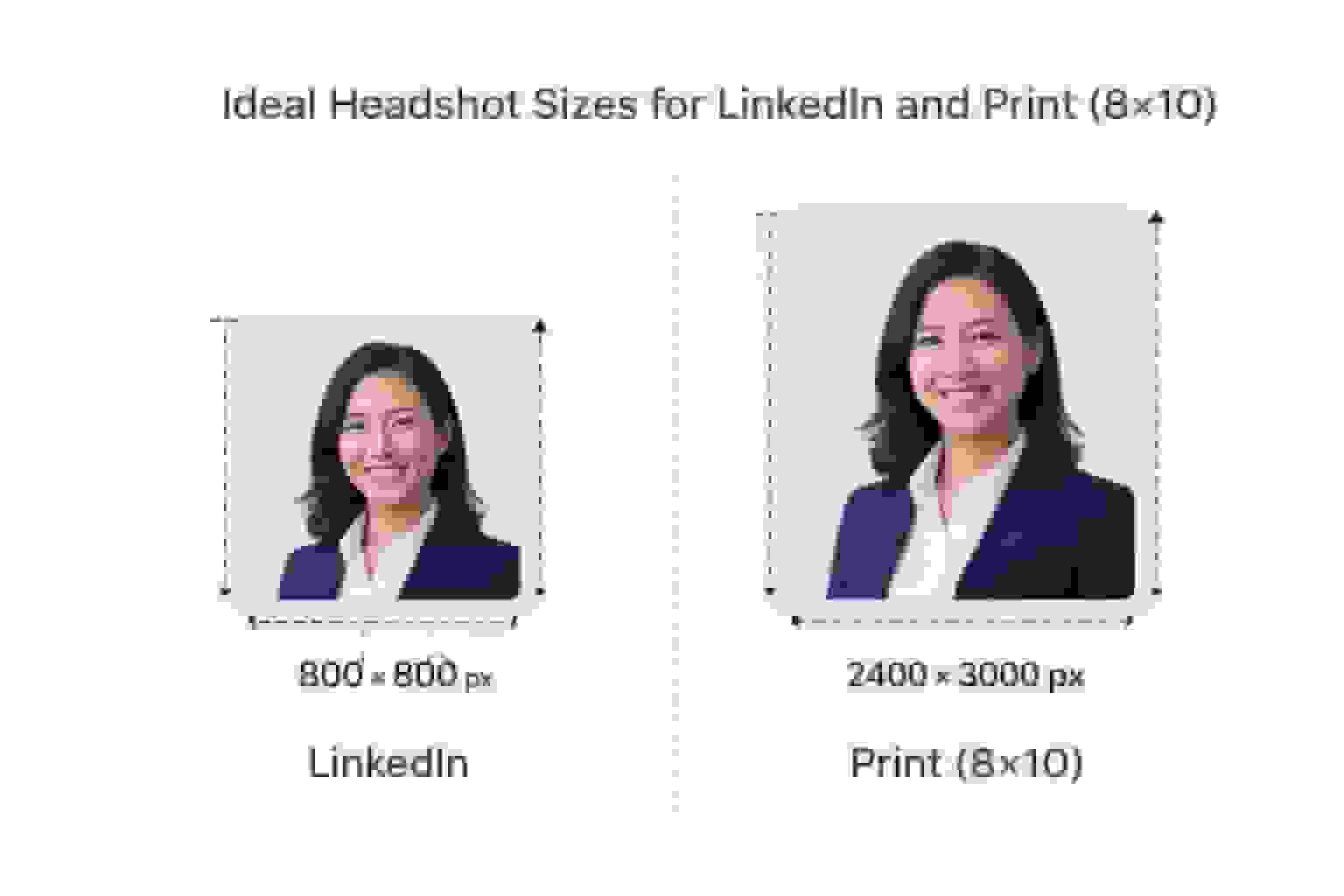
LinkedIn uses a square (1:1) profile photo that appears as a circle.
- Minimum size: 400 × 400 px (LinkedIn accepts up to 7680 × 4320)
- Best practice: export at 800 × 800 to 1200 × 1200 px for extra sharpness on modern screens
- File size limit: up to 8 MB
- Formats: JPG or PNG
Because LinkedIn crops your photo into a circle, keep your face centered, leave space above your head, and avoid important details near the corners.
Quick answer: Whether you create a LinkedIn portrait with a free AI tool or use a photographer, 800 × 800 px, 1:1, JPG is a safe choice if you only want one export for LinkedIn.
For tips on creating an effective LinkedIn headshot, see Professional LinkedIn Headshots — Complete Guide.
What Size Is an Instagram Profile Photo?
Instagram also uses a square profile picture displayed as a circle.
- Official size: none. Instagram's help centre publishes no profile picture size, and the 320 px often quoted comes from its page about photos shared in posts
- Appears as a small circle on your profile and an even smaller one beside comments, so start with a higher resolution for clarity
- Upload a square of 400 × 400 px or larger for a clean result
For what Facebook, YouTube, WhatsApp, X and TikTok publish, see profile picture size by platform.
If you want one square headshot that works for both LinkedIn and Instagram, a 1000 × 1000 px export is easy to downscale and keeps the image sharp.
Quick Platform Reference for Square Headshots
| Platform | Aspect Ratio | Recommended Size (px) | Notes |
|---|---|---|---|
| LinkedIn profile | 1:1 | 800 × 800 (min 400 × 400) | Cropped to a circle, 8 MB max |
| Instagram profile | 1:1 | 400 × 400 or higher | No official size; displayed as a small circle |
| X / Twitter profile | 1:1 | 400 × 400 | X's own recommendation; 2 MB max |
For other professional platforms (Upwork, Fiverr, freelancing sites), a square 400–800 px headshot in JPG format is usually accepted.
What Size Should a Resume Headshot Be?
Resume norms vary by country. Where photos are acceptable or expected, resume-ready professional portraits should meet these specifications:
Digital Resume (PDF)
- Square 400–600 px wide works well
- Keep file size under ~200 KB so your PDF stays small
Printed Resume
- A 2 × 2 inch square photo at 300 DPI is common
- That equals 600 × 600 pixels
If you are applying in the United States, check whether a photo is recommended for your field. When in doubt, prioritize LinkedIn and your website instead. For exact CV photo dimensions in cm, inches, and pixels by region, see Resume & CV Photo Size — Exact Dimensions Guide.
What Size Should a Website Headshot Be?
On websites, you control the layout. The main goal is consistency: same aspect ratio, similar head size, similar background for everyone.
Team Grid Thumbnails
- Aspect ratio 1:1 or 4:5
- Export around 200–400 px wide for regular screens and a 2× version for retina
Bio and Leadership Photos
- Aspect ratio 4:5 or 3:4
- Export around 500–1000 px wide plus a 2× version
- Aim for 80–200 KB per image to keep pages fast
A simple standard that works in most website themes:
- Square option: export at 800 × 800 px then let your CMS resize as needed
- Portrait option (more formal): export at 800 × 1000 px (4:5) for bios
BetterPic's 4K exports provide enough detail for designers to create separate crops for small grids, detailed bios, and press kits without re-shooting photos.
How to Crop a Professional Headshot
Correct cropping is as important as the size. Follow these steps whether you are preparing a photo from a traditional shoot or an AI headshot generator like BetterPic.
Step 1: Choose the Right Aspect Ratio
Pick a ratio based on where the image will appear:
- 1:1 for LinkedIn, Instagram, avatars, and team grids
- 4:5 for 8 × 10 prints, many websites, and more formal portraits
Start with a larger file (for example, a 4K BetterPic export) and crop down to the ratio you need.
Step 2: Use the Rule of Thirds for Eye Placement
Place the subject's eyes about one third of the way down from the top of the frame. This follows the classic rule of thirds and gives a balanced, natural look.
- Imagine a 3 × 3 grid over your image.
- Move the crop so the eyes sit close to the top horizontal grid line.
- Keep about 10–20% of the frame as headroom above the head.
Step 3: Frame Head and Upper Shoulders
For professional headshots:
- Include the top of the shoulders and some chest
- Avoid extreme close-ups where the chin or head is cut off
- Avoid wide full-body crops — they look tiny on mobile
- Let your face fill about 55–70% of the height of the image
Step 4: Keep the Background Simple
For LinkedIn, resumes, and corporate sites, simple profile-background cleanup can help you achieve the plain or softly blurred background that works best:
- Neutral gray, soft white, or subtle office tones
- No busy patterns, logos, or distracting objects
For help choosing the right background, see How to Choose the Best Headshot Background.
File Format, Color, and Resolution Best Practices
File Formats
- JPG (JPEG): Best default for photos. Good quality with small file sizes.
- PNG: Useful when you need transparency, or when combining graphics with your photo.
- WebP: Smaller files for modern browsers. Many web teams now use WebP with JPG as a fallback.
Color Profile
Export in sRGB so colors look consistent across browsers and devices.
Resolution Checklist
- For print: export at the final print size at 300 DPI (e.g., 2400 × 3000 px for 8 × 10 in)
- For web: match the pixel dimensions your platform or website design needs; DPI has no impact on how the image appears on screen
How BetterPic Helps with Headshot Sizes and Consistency
BetterPic is designed to make both individual and team headshots easy to use everywhere:
- High resolution: BetterPic delivers 4K headshots — enough pixels for clean 8 × 10 prints, LinkedIn crops, and website layouts from one set of files
- Multiple styles and backgrounds: Choose from 150+ outfits and backgrounds, then export neutral options for LinkedIn and creative looks for social media
- Commercial license: Full commercial rights to use on social media, websites, business cards, and more
- Team consistency: Generate matching crops, backgrounds, and styles so HR or marketing no longer has to chase people for new photos
Because all images start at high resolution, you can meet regional resume image standards and create versions for LinkedIn, your website, and print from the same session.
For a comparison of AI headshot generators and how they handle image quality, see how the best AI headshot generators compare. If you want to try AI headshots for free, BetterPic also offers a free AI headshot generator with 4K output.
Frequently Asked Questions
What size should my LinkedIn headshot be?
Use a square 1:1 headshot. LinkedIn requires 400 × 400 px minimum, but exporting at 800 × 800 or 1000 × 1000 px gives a sharper result on modern devices. Keep your face centered with your eyes about one third from the top.
What resolution do I need for an 8×10 printed headshot?
For a high-quality print, aim for 300 DPI at 8 × 10 inches, which equals 2400 × 3000 pixels.
What are the standard 8×10 headshot dimensions?
Physically, a standard headshot print is 8 × 10 inches (about 20.3 × 25.4 cm) with a 4:5 aspect ratio. Digitally, prepare the file at 2400 × 3000 px for 300 DPI printing.
How do I crop a professional headshot?
Use the rule of thirds grid: choose a 1:1 or 4:5 crop, place the eyes on or near the top horizontal third line, include head and upper shoulders, and leave a small amount of headroom above the head.
What square profile photo size works for both Instagram and LinkedIn?
Export a square JPG at 800 × 800 or 1000 × 1000 px. LinkedIn accepts 400 × 400 px and higher, Instagram stores profile photos at 320 × 320 px, so an 800–1000 px source keeps both platforms sharp.
What dimensions are recommended for a resume headshot?
For digital resumes, use 400–600 px square. For printed resumes, use 600 × 600 px (2 × 2 inches at 300 DPI). For detailed CV photo specs by region, see the Resume & CV Photo Size Guide.
Sources & References
- LinkedIn Profile Photo Tips — LinkedIn
- How Your Profile Photo Impacts Your LinkedIn Presence — LinkedIn Official Blog
- AI Image Generation Market Report — Grand View Research
- How AI Is Changing Photography — Forbes
- The Power of Team Photos on Company Websites — Nielsen Norman Group

Written by
Apoorv SharmaHead of Performance
Apoorv leads performance and growth at BetterPic with 9+ years of experience across SEO, SEM, and growth marketing. He oversees content strategy, data-driven marketing, and hands-on testing of AI headshot platforms. Previously held senior performance marketing roles across the US, Belgium, and India.
- Google Analytics & Google Ads certified
- HubSpot Inbound & Content Marketing certified
- 9+ years in SaaS growth and performance marketing
Preferred source
Follow BetterPic on Google
Add BetterPic as a preferred source and our headshot guides are more likely to show up in your Top Stories, with a badge in AI Mode and AI Overviews.

Related professional headshots for individuals resources
Keep exploring this topic with focused resources from the B2C journey.
Primary destination:AI headshot generator
Frequently Asked Questions
What size should a LinkedIn headshot be?
- Use a square (1:1) headshot. LinkedIn requires a minimum of 400 × 400 pixels, but exporting at 800 × 800 or 1000 × 1000 pixels gives a sharper result on modern devices. The maximum file size is 8 MB. Use JPG or PNG format and keep your face centered, since LinkedIn crops the photo into a circle.
What resolution do I need for an 8×10 printed headshot?
- For a high-quality 8×10 inch print, aim for 300 DPI, which equals 2400 × 3000 pixels. This is the industry standard for actors, portfolios, and professional prints. In centimeters, an 8×10 inch headshot is about 20.3 × 25.4 cm.
What are the standard headshot dimensions?
- The standard print headshot is 8 × 10 inches (20.3 × 25.4 cm) with a 4:5 aspect ratio, prepared at 2400 × 3000 pixels for 300 DPI printing. For digital profiles, the standard is a square 1:1 crop at 400 × 400 pixels minimum (800 × 800 recommended). For resume photos, 600 × 600 pixels at 300 DPI is common.
How do I crop a professional headshot?
- Use the rule of thirds: place the subject's eyes about one third from the top of the frame. Choose a 1:1 crop for LinkedIn and social profiles, or 4:5 for prints and formal websites. Include head and upper shoulders, let the face fill 55–70% of the image height, and leave 10–20% headroom above the head. Keep the background simple and uncluttered.
What headshot size works for both Instagram and LinkedIn?
- Export a square JPG at 800 × 800 or 1000 × 1000 pixels. LinkedIn accepts 400 × 400 pixels and higher, and Instagram stores profile photos at 320 × 320 pixels, so an 800–1000 pixel source keeps both platforms looking sharp. This single export can be reused across most professional platforms.
What dimensions should a resume headshot be?
- For digital resumes (PDF), use a square photo at 400–600 pixels wide, keeping file size modest. For printed resumes, use 600 × 600 pixels (2 × 2 inches at 300 DPI). The standard international CV photo size is 3.5 × 4.5 cm. Check whether a photo is recommended for your target country and industry before including one.
Related articles
View all articles
Business casual headshots: what to wear, backgrounds and examples
What business casual means in a headshot, what to wear, which colors and backgrounds work, when a suit is still the better choice, and three examples of where the line sits.
Hairstyles for headshots: how to wear your hair for a professional photo
How to wear your hair for a professional headshot: when to cut or color it, how to handle frizz and flyaways, what works for short, long, curly and braided hair, and what changes when the headshot is made with AI.
How much does a headshot cost in 2026?
What professional headshots actually cost, what drives the range, the charges that are not in the quoted price, and how to compare a session against an AI alternative.
Cheap AI Headshots: What $29 Actually Gets You vs. a $400 Photographer
A no-BS breakdown of cheap AI headshots in 2026: what they cost, how they compare to studio photography, and whether the results actually work for LinkedIn.
Professional Headshots: The Complete Guide to Getting Yours Right
Everything you need to know about professional headshots: how to get them (photographer, DIY, AI, corporate), what to wear, posing tips, lighting.
How to Get a Professional Headshot for Your Career
A complete guide to getting a professional headshot for your career—compare photographers, AI headshot generators, and DIY options by cost, quality, and speed.
Save 87%on average on your professional photos.
Whenever, wherever you are.
Get studio-quality, 4K images in a variety of outfits & settings in less than an hour.
Get your headshots nowStart now
