
A Modern Headshot Corporate Strategy to Scale Your Team's Look
A modern headshot corporate program is so much more than just a folder of employee photos. Think of it as a strategic asset, one that drives brand consistency and builds trust from the very first impression.
This playbook is all about ditching the old, expensive, and logistically nightmarish photoshoots for a scalable system that actually works for today's distributed teams. We’ll walk through a powerful hybrid workflow that combines the raw efficiency of AI with the essential final touch of human creativity, letting you deliver consistent, high-quality headshots without breaking the bank.
Why Scalable Corporate Headshots Are a Business Imperative
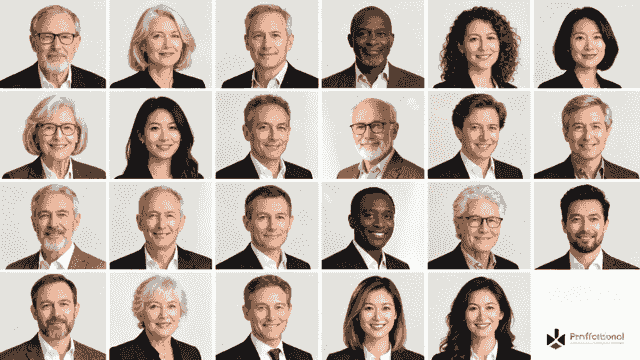
Let's be honest: in many cases, your employees' LinkedIn profiles are the new front door to your business. It's often the very first place clients, partners, and potential hires interact with your team.
When those profiles feature a mishmash of outdated, inconsistent, or low-quality photos, it creates a disjointed and unprofessional brand image. The old model of flying a photographer out to every office just doesn't work anymore, especially with remote and hybrid teams scattered across the globe.
The real challenge is maintaining brand cohesion across hundreds—or even thousands—of employees, no matter where they log in from. This isn't just about looking good; it's about building a unified visual identity that communicates competence and reliability at every single touchpoint.
The Shift from Perk to Strategic Asset
A formal headshot program used to be a nice-to-have, a simple employee perk. Today, it’s a core component of your corporate branding, talent acquisition, and even your sales strategy.
A cohesive look across professional networks, internal directories, and sales proposals directly strengthens brand trust. It’s the digital equivalent of a company uniform—a subtle but powerful signal that everyone is part of the same professional, organized team.
And this visual alignment delivers real, tangible benefits that leadership can get behind.
- Boosts Recruitment: A sharp, uniform appearance on platforms like LinkedIn makes your company and its people more approachable to top-tier talent. It projects an image of an organized, successful, and detail-oriented organization before a single message is even sent.
- Strengthens Brand Trust: When clients see a consistent, professional style from your sales reps, support staff, and C-suite, it builds subconscious confidence. It tells them your brand is reliable and cares about the details.
- Improves Internal Cohesion: For remote teams that rarely meet in person, seeing unified headshots in Slack, Teams, and the company directory fosters a genuine sense of belonging and team identity. It puts a professional face to the name.
The difference between the old way and this new, scalable approach is stark. Let's break it down.
Traditional vs AI-Powered Headshot Programs
Here’s a quick comparison of the old way of managing headshots versus the scalable, AI-assisted approach we're building for the enterprise.
| Attribute | Traditional Process | AI-Hybrid Enterprise Process |
|---|---|---|
| Logistics | Complex scheduling, travel for photographers, location scouting. | Simple employee self-service via a web platform. |
| Consistency | Varies by photographer, lighting, and location. | 100% consistent style, background, and lighting. |
| Scalability | Extremely difficult and expensive for distributed teams. | Infinitely scalable for remote, hybrid, and global workforces. |
| Turnaround Time | Weeks or months from photoshoot to final delivery. | Minutes or hours from photo upload to delivery. |
| Cost Per Headshot | High ($150 - $500+ per person). | Low (often 90-95% less than traditional). |
| Employee Experience | Requires taking time out of the workday for a scheduled shoot. | Employees complete on their own time in under 5 minutes. |
| Updating & Onboarding | New hires wait for the next "photo day," if one is scheduled. | New hires can get their official headshot on Day 1. |
As you can see, the AI-hybrid model isn't just an incremental improvement—it's a fundamental change in how companies can manage their visual brand identity at scale.
The strategic value here is undeniable. Professionals who add a high-quality headshot to their profiles see a huge spike in engagement. Some data even suggests connection acceptance rates can jump by 20–40%. Internally, HR teams find that standardized images make candidate screening faster, while marketing gets on-brand assets that meet tech specs from day one, eliminating endless back-and-forth. You can learn more about using headshots as a strategic marketing asset and all the details that go into it.
This playbook is your guide to building that scalable system. It's time to move your company from a chaotic collection of random selfies and vacation photos to a powerful and consistent visual brand.
Crafting Your Corporate Headshot Style Guide
Think of your corporate headshot style guide as the single source of truth for your entire program. It’s the foundational document that ensures every image—whether it’s shot in a New York studio, submitted by a remote employee in Berlin, or generated by an AI platform—feels like it belongs to your brand.
Without this blueprint, you're just guessing. You'll end up with the same disjointed, mismatched look you’re trying to fix in the first place. This isn't about creating rigid, restrictive rules. It’s about defining a clear, flexible framework that tells photographers, editors, and even AI tools exactly how to produce work that aligns with your company's identity.
A strong guide removes all the guesswork and streamlines the entire process, saving a massive amount of time and preventing expensive rework down the line.
Defining Your Core Visual Elements
First things first, anchor your headshots in your brand's existing visual language. Take a hard look at your company’s logo, website design, and marketing materials. Does your brand feel modern and energetic, or is it more traditional and established? The answer will inform every decision you make from here.
For example, a tech startup might go for bright, dynamic lighting and authentic, environmental backgrounds showing collaborative office spaces. A financial institution, on the other hand, would likely lean toward classic, studio-style portraits with subtle, professional backdrops that scream trust and stability. The goal is to make your headshot corporate library a seamless extension of your brand.
Here's what to nail down:
- Lighting and Mood: Are you going for soft, even lighting for an approachable feel? Or something more dramatic and directional for a bold, cinematic look? Get specific about the mood, using terms like "warm and welcoming" or "crisp and professional."
- Color Palette: Define the primary and secondary colors for backgrounds and even suggest complementary wardrobe tones. These should pull directly from your brand’s official color scheme to keep everything visually consistent.
- Composition and Framing: Decide exactly how subjects should be framed. Is it a tight shot on the face, or a wider crop from the chest up? Consistency here is absolutely critical for a uniform look when you display the headshots in grids and galleries.
Backgrounds: The Foundation of Consistency
The background is your most powerful tool for unifying headshots, especially when you're dealing with a distributed, global workforce. You need to pick a direction that is both on-brand and logistically feasible for a hybrid AI workflow.
Your choice of background sends a direct signal about your company culture. A solid gray backdrop communicates formality and tradition. A subtly blurred office environment can feel more modern and accessible. The key is to choose one primary style and stick with it.
You really have three main options here:
- Solid Color Studio Background: This is the most traditional route and, frankly, the easiest to replicate consistently, especially with AI. Define the exact color with a HEX code (e.g., #F4F4F4 for a light gray).
- Environmental Office Background: This approach adds context and personality but demands strict guidelines. You have to specify the exact look you want—for example, a blurred, open-plan office with neutral tones and plenty of natural light.
- Abstract or Branded Graphic: A more creative option is using a subtle brand pattern or an abstract gradient. This can look fantastic but requires you to provide high-quality digital assets for the AI to use as a base.
This is an excellent example from a real style guide that visually breaks down these elements for everyone involved.
A visual approach like this one instantly clarifies expectations around lighting, posing, and backgrounds. It's way more effective than a wall of text.
Wardrobe and Posing Guidelines
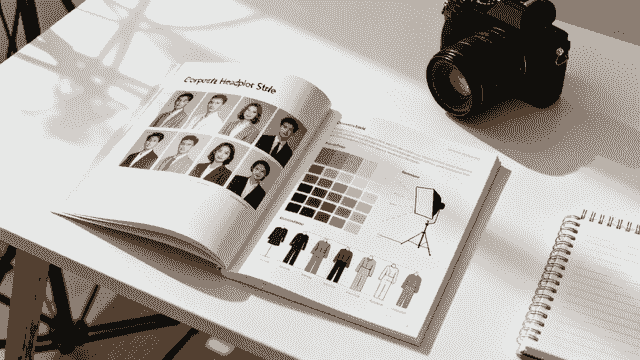
Finally, your guide needs to give people clear, easy-to-follow advice on what to wear and how to pose. This is where you can prevent the most common mistakes and make sure everyone looks polished and professional.
For wardrobe, go beyond vague terms like "business casual." Provide visual examples of dos and don'ts. Advise against busy patterns, big logos, and distracting jewelry. Suggest solid colors that complement your brand's palette. Recommending layers, like a blazer or a jacket, is a pro tip—it adds dimension and professionalism to almost any outfit.
Posing guidance is just as important. You’re not trying to turn your employees into professional models, but a few simple instructions can make a world of difference. Specify whether subjects should face the camera directly or be angled slightly. Encourage genuine, confident expressions. For a modern headshot corporate style, a subtle, natural smile almost always beats a stern, serious look.
Designing a Frictionless Employee Experience
A meticulously crafted style guide is worthless if your employees find the process too complicated or time-consuming. The single most important factor for program success isn't your AI prompt or background choice; it's high participation rates. That only happens when the employee experience is simple, intuitive, and respects their time.
Your goal is to eliminate every possible point of friction. From the first email to the final photo delivery, the whole workflow has to feel effortless for your team. When people see the process as easy, adoption becomes a natural outcome rather than an uphill battle.
Streamlining How People Participate
For a hybrid workforce, you'll need a two-pronged approach that caters to both in-office and remote employees without creating a dip in quality. The secret is making each path equally straightforward.
For on-site employees, manual scheduling is a recipe for headaches. Instead, set up a simple, automated scheduling system. Tools like Calendly or SavvyCal can be linked directly in your announcement email, letting employees book a time slot that fits their calendar in just a few clicks. This puts them in control and drastically cuts down your administrative work.
For your remote team, the process should be even simpler. Create a dedicated portal or a straightforward email workflow where they can upload a few high-quality photos taken with their smartphone. Just provide a short, visual guide showing them how to take a decent picture—good lighting, a plain background, and a clear view of their face are the only real requirements. This self-submission model is the engine of a truly scalable corporate headshot program.
Remember, the average employee isn't a photographer. Overly technical instructions will just cause confusion and drop-off. Keep your guidance simple: "Stand facing a window for natural light" is far more effective than trying to explain the intricacies of soft lighting.
Communication Is Everything
You can't just launch the program and expect everyone to jump on board. A clear, proactive communication plan is essential for setting expectations, generating a bit of excitement, and walking employees through the process.
Your communication cadence should look something like this:
- The Announcement Email: This is your big launch. Clearly explain the "why" behind the program—how it strengthens brand presence and benefits them personally. It's a great idea to showcase a few examples of the new headshots here to get people excited.
- The Preparation Guide: A week before a scheduled shoot or as part of the remote submission instructions, send a concise guide. Remind them of wardrobe suggestions from the style guide and offer simple tips for looking their best.
- Confirmation and Reminders: Automated emails confirming their booking or submission are non-negotiable. For in-person shoots, a quick reminder the day before helps minimize no-shows.
This structured communication makes sure no one feels lost or unsure about what's expected of them, which is vital for keeping the momentum going. To get more ideas for getting your entire organization on board, explore our detailed guide on implementing new headshots for teams.
Navigating Legal and Consent Considerations
Finally, addressing the legal and ethical side of image usage is non-negotiable, especially when AI enters the picture. You have to be transparent with your team about how their images will be used and get their explicit consent.
Work with your legal department to draft a clear, easy-to-understand consent form. Avoid dense legalese; the goal here is clarity, not confusion.
The form should explicitly cover:
- Usage Rights: Specify where the headshots will be used (e.g., company website, LinkedIn, internal directories, marketing materials).
- AI Processing: Clearly state that their submitted photos will be processed by AI software to generate the final corporate headshot.
- Data Storage: Briefly explain how their original and AI-generated images will be stored and for how long.
Making consent a transparent and mandatory step builds trust and protects both the employee and the company. It formalizes the process and shows you respect your team's rights, which is fundamental to a positive and frictionless experience for everyone involved.
Building Your Hybrid AI and Human Editing Workflow
This is where the magic really happens—the operational heart of your entire corporate headshot program. A truly scalable system isn't about choosing AI over human talent. It's about blending the raw speed of technology with the irreplaceable judgment of a skilled professional. This hybrid approach delivers results that neither could achieve alone.
The process kicks off with selecting the right technology. Let's be clear: not all AI platforms are created equal. You're looking for a tool that not only generates realistic images but also gives you granular control over the output, making it easy to align everything with your style guide.
Essentially, the AI does the heavy lifting. It standardizes backgrounds, applies consistent lighting, and can even handle minor wardrobe adjustments like removing wrinkles or swapping a shirt color. This first pass by the machine is what creates consistency across the entire company, at scale. You can dive deeper into the specifics with our complete guide on AI headshots.
Selecting and Configuring Your AI Platform
Your first step is choosing an AI partner. Enterprise-grade platforms are built differently than the consumer apps you see advertised on social media. You need features designed for business use: team management dashboards, centralized billing, and—most importantly—the ability to create and save style presets.
Once you have your platform, the real work begins. This is where you translate your style guide into specific commands and settings the AI can actually understand and execute.
- Prompt Engineering: You’ll need to write clear, descriptive prompts that pull directly from your style guide. For example, instead of just "office background," a much better prompt would be: "Professional corporate headshot with a brightly lit, softly blurred open-plan office background, featuring neutral tones of gray and white."
- Setting Configuration: Next, you dial in the specific parameters for lighting, composition, and color. You might set the lighting to "soft, even studio lighting from the front" and the framing to "chest-up portrait."
- Style Presets: The crucial final step is to save all of this as a template. This ensures that every single headshot generated for your company—whether for the CEO in New York or a new intern in Singapore—starts from the exact same visual baseline.
The core idea is to use AI for what it does best: repetition and consistency. By locking in these settings, you eliminate the variations that plague traditional photoshoots, ensuring every image perfectly reflects your brand.
This simple flow shows how the employee experience is designed from the very beginning to be straightforward and clear.
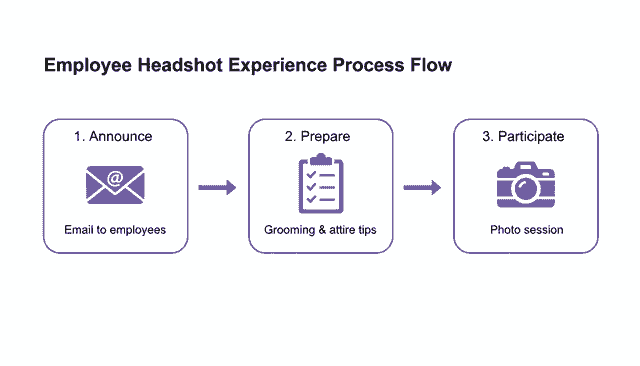
When the process is this simple, you reduce friction and see much higher participation rates from day one.
The Irreplaceable Role of the Human Editor
AI is an incredible tool, but it's not an artist. It can generate a technically perfect image that feels soulless or misses subtle, human imperfections. This is where your human editor comes in as the final, critical step in the quality control process. Their job isn't to start from scratch, but to elevate the AI's output from "good enough" to "truly professional."
The editor’s review should follow a standardized checklist. They are the ultimate gatekeepers of quality, looking for specific issues that AI models often overlook.
Their main responsibilities fall into three buckets:
- Correcting AI Artifacts: They meticulously scan for common AI errors—things like oddly shaped fingers, unnatural textures in clothing, or slight distortions in facial features that just don't look right.
- Ensuring Natural Skin Tones: AI can sometimes produce skin tones that look flat or have a slight color cast. A human retoucher can make subtle adjustments to ensure everyone looks natural and authentic.
- Making Final Creative Judgments: This is the fine art of it all. Maybe the lighting on one side of the face needs a tiny lift, or a single stray hair is distracting. These are the nuanced, final-touch decisions that still require a human eye.
This hybrid workflow has a massive impact on efficiency. We're seeing industry data show that AI-assisted tools can slash per-image editing time by up to 50% for some studios. This huge time savings is why vendors can finally offer affordable corporate packages at scale. It’s a trend that over 4,500 professional photographers are leaning into, increasing their investment in these exact technologies.
By combining the consistency of AI with the critical oversight of a human expert, you build a powerful, scalable engine for producing a high-quality corporate headshot library. It’s an efficient, cost-effective system that delivers brand cohesion without sacrificing the authentic, human quality that makes a portrait truly great. For large, distributed companies, this is the workflow that finally solves the headshot problem.
Measuring Program ROI and Driving Adoption
Getting your new headshot corporate program launched is a huge win, but let's be honest, the real work starts now. To make sure this initiative sticks around for the long haul, you have to prove its worth with solid data and get the entire company excited to participate. This isn't just about showing off nice pictures; it's about connecting the dots between your program and the business outcomes leadership actually cares about.
The heart of this effort is demonstrating a clear return on investment (ROI). A well-run headshot program provides value that goes far beyond aesthetics, touching everything from brand consistency to pure operational efficiency. By tracking the right metrics, you can build a business case that’s impossible to ignore.
Identifying Your Key Performance Indicators
Before you can measure success, you have to define what it looks like. Your Key Performance Indicators (KPIs) should be a smart mix of quantitative data—the hard numbers that prove efficiency and cost savings—and qualitative feedback that tells the human side of the story.
Start with the metrics that are easiest to track. These give you a clean, objective look at the program's performance and financial impact.
- Employee Participation Rate: This is your number one adoption metric. Set a clear goal, like getting 80% of all employees an approved headshot within the first six months.
- Turnaround Time: Track the average time from an employee's photo submission to when they receive their final, approved headshot. A quick turnaround—say, under 48 hours—is a massive win for efficiency and employee experience.
- Cost-Per-Headshot: This is your golden metric for ROI. Calculate the total cost of your AI-hybrid process and stack it up against what you used to spend on traditional photoshoots. The difference is often staggering.
While the numbers tell part of the story, the qualitative feedback shows you how your team actually feels about the program. This context is crucial for understanding what’s really working.
A successful program doesn't just check a box; it makes employees feel seen and valued. Gathering their direct feedback is the only way to know if you're hitting that mark. It provides the "why" behind your participation numbers.
Put together simple, anonymous surveys to get a pulse on employee satisfaction. Ask them to rate the ease of the process, how happy they are with their final photo, and how it makes them feel about representing the company. These testimonials are incredibly powerful when you’re sharing results with leadership.
To keep everything organized, track your progress in a simple table.
Key Metrics for Program Success
Here's a straightforward way to outline the quantitative and qualitative metrics for evaluating your headshot program's success.
| Metric Category | KPI Example | How to Measure |
|---|---|---|
| Quantitative | Employee Participation: Percentage of employees with an approved headshot. | Track completions in your HRIS or program dashboard. Aim for 80% in 6 months. |
| Quantitative | Turnaround Time: Average time from submission to final delivery. | Measure timestamps from your program's workflow. Target under 48 hours. |
| Quantitative | Cost Savings: Cost-per-headshot vs. traditional photography costs. | Compare invoices. Highlight the percentage saved (e.g., 90% reduction). |
| Qualitative | Employee Satisfaction (CSAT): Overall satisfaction with the process and result. | Deploy a 1-5 scale survey post-delivery. Target an average score of 4.5/5. |
| Qualitative | Brand Consistency: Percentage of public-facing profiles (e.g., LinkedIn) using the new headshot. | Manually audit a sample of employee profiles quarterly. |
This blend of metrics gives you a complete picture, making it easy to report back to stakeholders on what a success this program has been.
Calculating the Financial ROI
For most stakeholders, the financial argument is the most persuasive one. The headshot corporate industry is a big business, valued at around $2.5 billion in 2023 and projected to hit $5.8 billion by the early 2030s. That growth comes from companies looking for scalable solutions and moving away from old-school photoshoots that could easily cost $400–$600 per person. You can get a deeper look into the business of headshot photography and what's driving the market.
With an AI-hybrid model, the cost savings are immediate and significant. To get a clear idea of what this means for your company, take a look at our enterprise pricing models and see just how much you can reduce costs. When you walk into a meeting and show a 90% cost reduction per headshot, the program’s value speaks for itself.
Strategies for Driving Program Adoption
A successful rollout isn't a one-and-done announcement; it's an ongoing internal campaign. To get high participation rates, you need to keep the program visible and weave it into the fabric of the company.
Make getting a headshot a standard part of your new-hire onboarding process. It should be right there on the checklist next to setting up email and getting a laptop. This normalizes the process from day one and keeps your internal directories looking fresh and professional.
For your current employees, launch a communications blitz across multiple channels:
- All-Hands Meetings: Kick off the program with a quick announcement and show off a few fantastic examples from your pilot group or some early adopters.
- Internal Newsletters: Run a "Headshot of the Week" feature to keep the initiative top-of-mind and give a shout-out to team members.
- Team Manager Engagement: Give managers the talking points to encourage their teams, explaining how a unified, professional look helps everyone.
By proving a clear ROI and driving adoption with a smart rollout plan, you’ll elevate your headshot corporate program from a one-off project to a strategic, value-driving part of the business.
Common Questions About AI Headshot Programs
Whenever you introduce a new way of doing things, especially one that involves AI, questions are bound to pop up. Most of the time, they circle back to three core themes: quality, privacy, and the actual effort involved. Let's tackle the big ones enterprises ask when they're looking at a modern headshot corporate program.
My goal here is to give you straight, honest answers so you can move forward with confidence and make the right call for your brand and your people.
Can AI Really Create Photorealistic Headshots?
This is usually the first question out of the gate, and it's a fair one. The short answer is yes, absolutely. But there’s a huge catch: it all comes down to the quality of the AI platform you're using. The cheap consumer apps floating around often produce images that land squarely in the "uncanny valley"—they look almost real, but something is just slightly off, making them feel fake.
Enterprise-grade platforms are a different beast entirely. They've been trained on millions of high-end professional portraits and are built to understand the tiny details that matter, like the nuances of studio lighting, realistic depth of field, and natural skin textures.
When you pair a top-tier AI generator with good source photos from your employees and a final once-over from a human editor, the results are pretty much indistinguishable from a traditional photoshoot.
The hybrid workflow is the secret sauce. AI does the heavy lifting, creating a perfectly consistent look across thousands of employees. Then, a human editor swoops in to catch and fix the tiny imperfections the AI might miss. That's how every single portrait hits the mark for quality and authenticity.
How Does This Process Handle Diversity and Inclusion?
This is a critical concern. Early AI models definitely struggled with bias, but the leading platforms today have come a long way. They are now specifically designed to preserve the unique facial features, skin tones, and individual characteristics from the original source photos.
Remember, the AI isn't inventing a person out of thin air. It's working from a real person's photos to enhance and standardize them. It's all guided by what the employee provides.
To make sure you get this right, you need to:
- Pick a Proven Platform: Go with a provider that has a solid track record of producing high-quality, unbiased results across a wide range of ethnicities, ages, and appearances. Ask for examples.
- Run a Small Pilot: Before you go all-in, test the system with a diverse group of employees. Get their feedback and see the results for yourself.
- Lean on Human Oversight: A human editor is your final quality check. They ensure every person is represented accurately and professionally, making subtle tweaks to skin tone or features to get a perfect match.
Is Our Company and Employee Data Secure?
Data security is completely non-negotiable, particularly when you're talking about employee photos. Any reputable AI headshot provider built for the enterprise gets this and will have serious security protocols in place. Before you sign anything, you have to dig into their data handling policies.
You should be looking for a provider that offers:
- Crystal-Clear Data Usage Policies: They need to state, in no uncertain terms, that your photos won't be used to train their public AI models without your explicit permission.
- Airtight Data Storage: Your data must be encrypted both in transit and at rest. This is standard practice, and you shouldn't settle for less.
- Firm Data Retention Schedules: The provider should have a clear policy on how long your data is kept and an easy process for deleting it completely when you ask.
Always, always have your legal and IT security teams review the terms of service. A partner worth their salt will be completely transparent about their security measures and ready to answer any questions you throw at them.
How Much of a Hassle Is This for Our Employees?
Honestly, one of the biggest wins of this whole model is how little it asks of your team. Think about a traditional photoshoot: coordinating schedules, commuting to a studio, and taking a big chunk out of the workday. This AI-driven process is the complete opposite.
The entire thing takes an employee less than 5 minutes. They just need to find a spot with decent light, snap a few selfies on their phone, and upload them. No scheduling nightmares, no travel, and they can do it on their own time. This ridiculously easy experience is why we see participation rates that blow traditional headshot corporate programs out of the water. It respects your team's time and delivers better, more consistent results for the company.
Ready to modernize your company's visual identity? With BetterPic, you can get studio-quality, consistent, and on-brand headshots for your entire team in hours, not months. Our photorealistic AI, combined with professional human editors, ensures every portrait is perfect. Get professional AI headshots for your team today.
Save 87%on average on your professional photos.
Whenever, wherever you are.
Get studio-quality, 4K images in a variety of outfits & settings in less than an hour.
Get your headshots nowStart now
