
How to Choose the Perfect Background for AI Headshots
This article is part of our Professional Headshots collection.
If you would rather judge with your eyes, our headshot backgrounds page shows each option as a real result.
I've reviewed thousands of AI headshots at this point, and the single biggest mistake people make isn't their expression or their outfit. It's the background. A bland or mismatched background can tank an otherwise great photo, and the right one quietly does heavy lifting for your professional image.
Here's the short version of what works:
- Neutral solid colors (light gray, white, soft blue) work for 80% of professionals
- Subtle gradients give a modern edge without being distracting
- Blurred office settings add context but need to stay simple
- Outdoor backgrounds are risky for most industries — proceed with caution
- Match the background to your industry norms, not your personal taste
Let me walk you through everything I've learned about getting this right.
AI Background Tips: Watch This First
What Background Colors Work Best for Professional Headshots?
The best background colors for professional headshots are neutral tones — light gray, white, and navy blue — because they keep the focus on your face and work across every platform and screen size.
Here's what I recommend by color and when to use each one:
- Light gray — The workhorse. It flatters almost every skin tone, doesn't blow out on bright screens, and looks professional without being boring. If you can only pick one, pick this.
- White — Clean, minimal, and perfect for LinkedIn profiles and corporate directories. The downside: it can wash out lighter skin tones if the lighting isn't right.
- Navy blue — Signals authority and trust. Bankers, lawyers, consultants, and executives gravitate toward this for good reason. It photographs well and holds up at any image size.
- Soft blue or teal — A good pick for tech, marketing, and design professionals who want to look approachable and forward-thinking without going off the rails.
- Muted green — Works well for healthcare, wellness, and sustainability-focused roles. It reads as calm and grounded.
Colors to Avoid
Stay away from bright red (aggressive), neon anything (unprofessional), and black (creates a floating-head effect unless the lighting is perfect). Also skip colors that are too close to your skin tone or outfit — you want contrast, not camouflage.
How Do Texture and Lighting Affect Your Headshot Background?
Subtle texture adds visual interest and warmth to an AI headshot, while proper lighting balance between you and the background prevents the image from looking flat or fake.
Texture is one of those details most people skip, but it makes a real difference. A soft gradient, a faint linen-like texture, or a gentle paper finish gives your headshot depth. It looks less like a cutout pasted onto a colored rectangle and more like an actual photograph.
Here's what to keep in mind:
- Soft gradients (light center fading to slightly darker edges) naturally draw the eye toward your face. This is the single most effective texture trick.
- Faint textures like canvas or paper add warmth. They're especially good for creative industries where a sterile white background might feel too clinical.
- Busy patterns, bold textures, or geometric designs — skip them entirely. They fight with your face for attention, and your face should always win.
On lighting: the background lighting needs to match the lighting on you. If your face is warmly lit but the background looks like it's under fluorescent office lights, the whole image feels off. AI tools have gotten better at handling this, but it's still worth paying attention to. When testing backgrounds, squint at the image — if anything looks mismatched, it probably is.
Studio vs. Office vs. Outdoor: Which Background Setting Should You Choose?
For most professionals, a solid-color studio background is the safest and most versatile choice. Office settings work when they're clean and blurred. Outdoor backgrounds are best reserved for creative fields or personal branding.
This is where a lot of people overthink things. Let me simplify it.
Studio / Solid Color Backgrounds
Best for: Everyone. Seriously.
A clean studio background works for LinkedIn, your company website, your speaker bio, your conference badge — everything. It scales down perfectly to a tiny thumbnail and looks sharp on a full-page "About" section. There's a reason photographers have been using solid backdrops for decades.
Blurred Office or Workspace Backgrounds
Best for: Corporate roles, business development, consulting, finance.
A softly blurred bookshelf, a modern office with glass walls, or a conference room in the distance can add a sense of context. The key word is blurred. If someone can read the titles on your bookshelf, it's too sharp. The office should be a suggestion, not a feature.
Library or Academic Settings
Best for: Educators, researchers, authors, consultants.
These backgrounds signal intellectual credibility. They work well for people in knowledge-based roles, especially if your headshot will appear alongside published work, course materials, or speaking engagements.
Outdoor Backgrounds
Best for: Creative professionals, lifestyle brands, personal coaching.
Here's my honest take: outdoor backgrounds are hard to pull off for traditional business headshots. The lighting is inconsistent, the setting can look too casual, and they rarely scale down well to small profile pictures. If you're a life coach or a creative director building a personal brand, go for it. If you're in accounting, probably not.
What Background Works Best for My Industry?
The right background depends on your field's visual culture. Conservative industries favor solids and neutrals. Creative and tech fields have more room to experiment — but "creative" doesn't mean "distracting."
Here's a breakdown by industry:
Finance, Law, and Insurance
Stick to the classics: navy blue, charcoal gray, or white. These industries value trust, stability, and tradition. A plain studio background in one of these colors tells people you understand the professional norms. This isn't the place to express your artistic side.
Tech and Startups
You have more flexibility here. Soft gradients, modern color palettes (think muted blues, teals, or even a subtle warm gray), and clean studio backgrounds all work well. Avoid anything that looks dated within two years — trendy geometric patterns or neon accents age fast.
Healthcare and Medical
Light, clean backgrounds project competence and approachability — exactly what patients want to see. White and soft blue are the go-to choices. Avoid anything that feels cold or sterile (ironic, given the field). A warm off-white or the faintest blue tint strikes the right balance.
Education and Research
Library-style backgrounds or clean neutrals both work. The goal is to look knowledgeable and accessible. A soft gray or warm white keeps things professional. Blurred academic settings (bookshelves, campus architecture) can reinforce your credentials.
Creative Fields (Design, Marketing, Media)
This is where you can push boundaries — tastefully. A subtle texture, a muted color that reflects your brand, or a modern gradient can show personality. Just remember: the background should support your image, not compete with it. The most effective creative headshots I've seen use restraint.
Regional Differences in the U.S.
East Coast businesses tend to lean more conservative — darker backgrounds, more formal feels. West Coast and startup-heavy areas favor brighter, more contemporary looks. Think about where your audience is, not just where you are.
Does the Background Really Matter for LinkedIn Thumbnails?
Yes, absolutely. LinkedIn displays your headshot as a small circle, and a poor background choice can make you blend into the page or look unprofessional at thumbnail size.
This is a question I get a lot, and people are usually surprised by the answer. Here's why the background matters even at tiny sizes:
- Contrast is everything. At thumbnail size, your face needs to pop against the background. If there's not enough contrast, you'll look like a blob. Light gray or navy behind a face reads well. A busy outdoor scene behind a face? Forget it.
- Color signals professionalism. Even subconsciously, people register background color. A clean solid color reads as "put-together." A cluttered background (even blurred) reads as "didn't put much thought into this."
- Consistency with other team members. If your company page has 50 employees and 49 have consistent backgrounds while you have a selfie against a brick wall, you stand out — and not in a good way.
Before you finalize your background, shrink your headshot down to about the size of a nickel on your screen. If it still looks clean and your face is clearly visible, you're good.
Background Types Comparison
Each background type has strengths and trade-offs. Here's a visual overview:
Background Types: Pros, Cons, and Best Use Cases
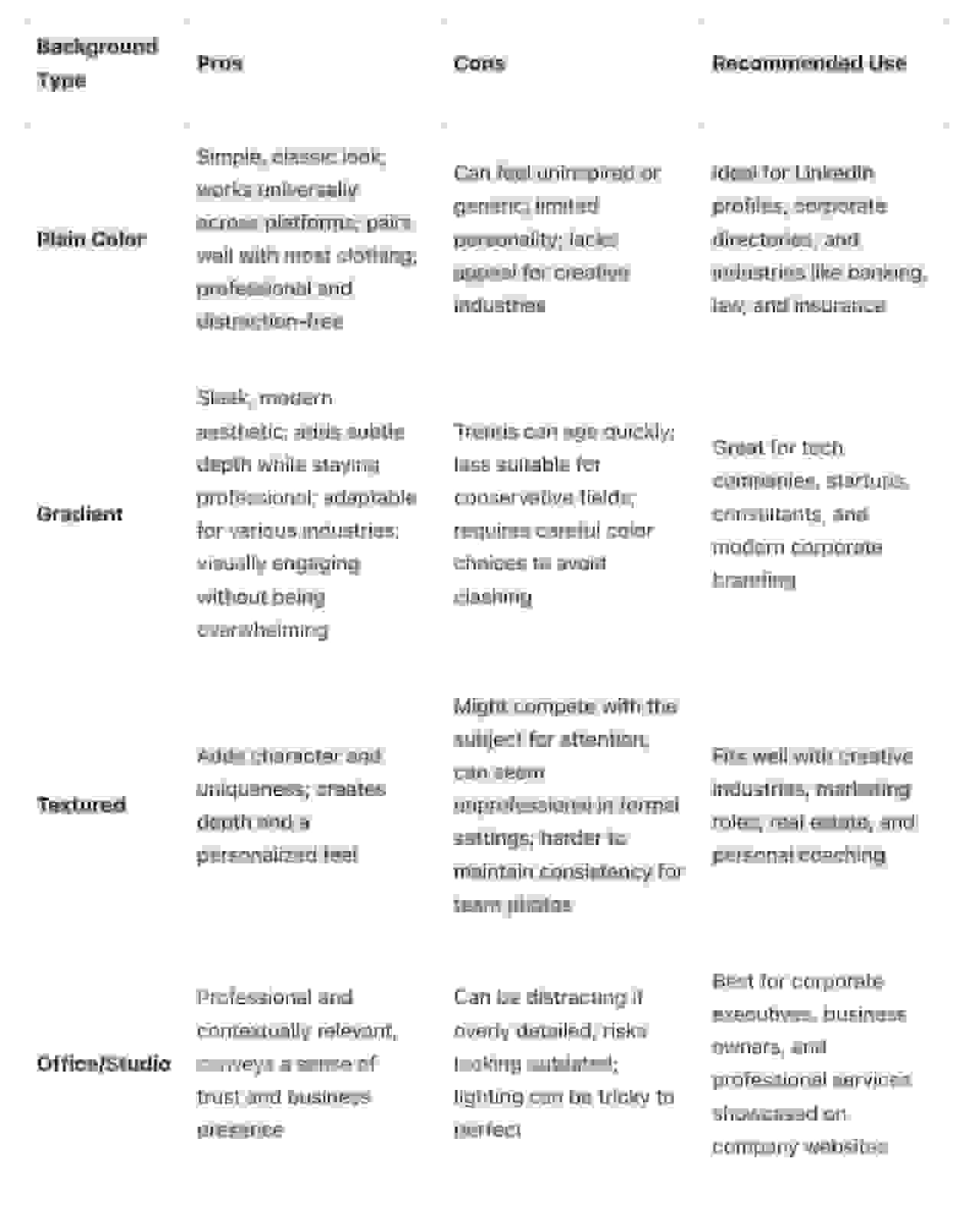
Quick summary of how these stack up:
- Plain solid colors — Most versatile. Work for any industry, any platform, any size. Hard to go wrong.
- Gradients — Add a modern, polished feel. Great for tech, marketing, and anyone who wants a slight edge over a flat color.
- Subtle textures — Bring warmth and depth. Good for creative professionals and personal branding. Keep the texture faint or it becomes a distraction.
- Blurred office/studio settings — Add professional context. Best for corporate, finance, and consulting roles. Need to be genuinely blurred — not just slightly out of focus.
- Outdoor/environmental — The highest risk, highest reward option. Can look fantastic for the right role or terrible for the wrong one. Test at multiple sizes before committing.
When testing any background type, always check how it looks both full-size and shrunk down to a profile picture. A background that looks great at 1000px might turn into visual noise at 100px.
How BetterPic Makes Background Selection Easy
Here's where I'd normally tell you to hire a photographer, rent a studio, and try 15 different backdrop rolls. Instead, BetterPic lets you test all of this digitally — and it does a genuinely impressive job.
150+ Professional Styles and an AI Style Builder
BetterPic offers over 150 pre-built background styles spanning everything from classic corporate solids to modern gradients to contextual office settings. But the real standout is the AI style builder, which lets you customize colors, textures, and settings to build exactly the background you have in mind. Want a warm off-white with a faint linen texture? You can make that. Want navy blue with a subtle vignette? Done.
You also get unlimited expert edits — real human professionals who fine-tune lighting, color balance, and background blending so the final product looks natural, not AI-generated.
4K Output in Under an Hour
Every headshot comes out at 4K resolution, which means it'll look sharp whether it's a LinkedIn thumbnail or a full-page spread on your company website. Turnaround is under an hour, which is faster than most photographers can get you a proof.
Your data stays protected under GDPR and CCPA compliance, and every image comes with a commercial license — use it wherever you want without worrying about rights.
What Does BetterPic Cost?
BetterPic's pricing is straightforward, and honestly competitive with what you'd pay for a single in-person headshot session:
- Basic Plan ($35): 20 headshots in 1 style, 2 AI edits. Good if you already know what you want.
- Pro Plan ($39): 60 headshots across 3 styles, 4 AI edits. This is the sweet spot for most people — you can test solid colors vs. gradients vs. office settings and see what actually works for you.
- Expert Plan ($79): 120 headshots in 6 styles, 8 AI edits, unlimited human edits for one photo, plus one redo. Best for people who want multiple polished options for different platforms.
- Team Plan ($49/seat, from $13 at volume): 60 headshots per person across 3 styles, unlimited human touch-ups, and a team dashboard for consistent company-wide branding.
Every plan includes 4K output and tiered customer support (48-hour response on Basic, down to 12 hours on Expert).
The ability to test multiple backgrounds quickly is what makes this approach so much better than traditional photography. With a photographer, you pick a backdrop before the shoot and hope for the best. With BetterPic, you can try a dozen options and pick the one that actually works.
How to Actually Pick Your Background (Step by Step)
If you've read this far and still feel unsure, here's a simple decision process:
- Start with your industry norms. Look at professional headshots from leaders in your field. What backgrounds do they use? Match that energy.
- Pick a solid color first. Light gray or navy blue. Generate your headshot with that background and see how it feels.
- Test a gradient version. Same color family, but with a soft gradient. Compare side by side.
- Try one contextual option. Blurred office, library, or whatever fits your role.
- Shrink all three to thumbnail size. The one that looks best small is probably your winner.
- Get a second opinion. Show two or three colleagues. People outside your head will notice things you won't.
For specific roles, I'd also recommend checking out BetterPic's pages for professional woman headshots and financial advisor headshots — they have good examples of backgrounds that work for those audiences.
Also check out our guide on AI headshot backgrounds for more inspiration.
FAQ: AI Headshot Backgrounds
What's the best background color for a LinkedIn headshot?
Light gray is the safest choice for LinkedIn. It provides good contrast with most skin tones and clothing, scales down cleanly to thumbnail size, and looks professional without being boring. Navy blue is a strong second choice, especially for finance, law, and executive roles.
Can I use a custom background for my AI headshot?
Yes. Tools like BetterPic offer an AI style builder that lets you customize colors, textures, and settings. You can also choose from over 150 pre-built styles. This is much more flexible than traditional photography, where you're limited to whatever backdrops the studio has on hand.
Should I use the same background for all my professional profiles?
For consistency, yes — especially if you're active on LinkedIn, your company website, and industry directories. Using the same or very similar backgrounds across platforms makes you instantly recognizable and projects a cohesive professional image.
Do outdoor backgrounds work for professional headshots?
They can, but they're tricky. Outdoor backgrounds work best for creative professionals, coaches, and personal brands. For traditional industries (finance, law, healthcare), a solid-color or gradient studio background is almost always a better choice. The main issues with outdoor backgrounds are inconsistent lighting and too much visual noise at small sizes.
How do I know if my headshot background looks good at small sizes?
Shrink it. Open your headshot and reduce it to roughly the size it'll appear as a profile picture (about 150x150 pixels). If your face is clearly visible and the background doesn't turn into a blurry mess of indistinguishable colors, you're in good shape. Solid colors and simple gradients almost always pass this test.
Does background matter more than lighting or expression?
No — your expression and lighting are still the most important elements of any headshot. But background is the easiest one to get wrong, and the easiest to fix with AI tools. Think of it this way: a great expression with a bad background loses some of its impact, but a mediocre expression with a perfect background still looks mediocre. Get all three right.
Sources & References
- LinkedIn Profile Photo Tips — LinkedIn
- How Your Profile Photo Impacts Your LinkedIn Presence — LinkedIn Official Blog
- AI Image Generation Market Report — Grand View Research
- How AI Is Changing Photography — Forbes
- Professional Headshot Photography Pricing — Thumbtack

Written by
Hertok KawangCustomer Success Specialist
Hertok works directly with BetterPic customers every day, giving him first-hand insight into what professionals need from their headshots. With 6+ years in customer support, he writes from real user experience and common questions he encounters daily.
- 6+ years in customer success and support
- Handled 10,000+ customer headshot consultations
- Expert in AI headshot quality assessment
Preferred source
Follow BetterPic on Google
Add BetterPic as a preferred source and our headshot guides are more likely to show up in your Top Stories, with a badge in AI Mode and AI Overviews.

Related headshot backgrounds resources
Keep exploring this topic with focused resources from the B2C journey.
Primary destination:Headshot backgrounds and styles
Frequently Asked Questions
What’s the best way to choose a background color for my AI headshot that complements my skin tone and outfit?
- To pick a background color that works well with your skin tone and outfit, think about contrast. If you have a lighter skin tone, darker shades like navy or charcoal gray often create a striking and polished look. On the other hand, for darker skin tones, softer hues like beige or pastel colors can offer a pleasing contrast. As for your outfit, opt for solid colors that complement the background without clashing. Neutral tones or rich jewel shades, such as emerald green or deep blue, typically work well. Try to steer clear of overly bright colors or busy patterns, as they can take the focus away from your face. The aim is to create a balanced, professional look that keeps the attention on you, not the background.
What are the advantages of using AI tools to try out different headshot backgrounds before deciding?
- Using AI tools to experiment with different headshot backgrounds comes with several perks. These tools make it easy to see how various colors, textures, and settings can elevate your professional image. Whether you're updating your LinkedIn profile or aligning with corporate branding, they help ensure your background matches your goals. Another big plus? They save you the hassle of traditional trial-and-error processes. With AI, you can fine-tune your background to create a polished and professional look that reflects your personal style - all before settling on the final version of your headshot.
How do professional standards and cultural preferences in the U.S. impact the choice of headshot backgrounds?
- In the U.S., professional headshots typically feature neutral, solid-colored backgrounds such as white, gray, or black. These backgrounds are timeless, keep the focus on the individual, and project a polished, professional image - perfect for corporate profiles or LinkedIn. Cultural preferences also influence these choices. In American settings, there’s a strong emphasis on simplicity and clarity, with a focus on facial features. Clean, uncluttered backgrounds are seen as professional and ensure the subject remains the center of attention.
Related articles
View all articles
How much does a headshot cost in 2026?
What professional headshots actually cost, what drives the range, the charges that are not in the quoted price, and how to compare a session against an AI alternative.
Cheap AI Headshots: What $29 Actually Gets You vs. a $400 Photographer
A no-BS breakdown of cheap AI headshots in 2026: what they cost, how they compare to studio photography, and whether the results actually work for LinkedIn.
Professional Headshots: The Complete Guide to Getting Yours Right
Everything you need to know about professional headshots: how to get them (photographer, DIY, AI, corporate), what to wear, posing tips, lighting.
How to Get a Professional Headshot for Your Career
A complete guide to getting a professional headshot for your career—compare photographers, AI headshot generators, and DIY options by cost, quality, and speed.
8 Headshot Poses That Actually Work (And When to Use Each One)
The 8 headshot poses that actually work — with specific guidance on when to use each one, how to nail it in a studio or with AI, and which industries.
How to Prepare for Professional Headshots and Make a Great Impression
Learn how to prepare for professional headshots with practical tips on wardrobe, posing, grooming, and choosing the right photographer.
Save 87%on average on your professional photos.
Whenever, wherever you are.
Get studio-quality, 4K images in a variety of outfits & settings in less than an hour.
Get your headshots nowStart now
